Save Videos from Any Website
This is the general-purpose page: paste a URL from a site that does not have its own page here, and we will try to work out what is on it. Coverage genuinely varies. Some sites work reliably, some work until they change their player, and some have never worked. If a paste fails here it usually means we cannot read that site rather than that you did something wrong.
Copy the address from your browser bar rather than from a share button where you can — in-app share links often expire or point at a redirect rather than the video. If the site is one of the platforms we cover specifically, that page will give better results than this one, because it knows what to expect.
Some things will never work here, and it is fairer to say so than to let you keep trying. We cannot download anything protected by DRM, which covers most paid streaming services. We cannot reach content that requires signing in — private accounts, members-only areas, paywalled articles or password-protected files — because that access belongs to your account and not to the URL. We also do not attempt to get around those restrictions where they exist.
✅ What Works
- Most social media platforms
- Video streaming sites
- Educational platforms
- News and media websites
- Entertainment platforms
❌ Limitations
- Private or password-protected videos
- Live streaming content
- DRM-protected content
- Copyright-restricted material
💡 Pro Tips:
• Make sure the video is publicly accessible
• Copy the complete URL including https://
• Try the direct video page URL for best results
Popular Supported Platforms
While we support many platforms, here are some of the most commonly used ones:
These have their own pages. For anything else, paste the URL above — whether it works depends on how that site serves video, and it will tell you either way.
Follow these simple steps to download content from any site you want:
Step 1: Copy the URL
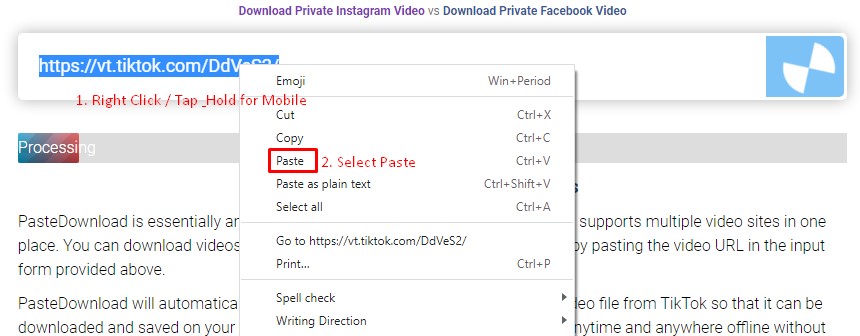
Navigate to the site (platforms) and find the video, audio, or photo you want to download. Copy the URL from your browser's address bar or use the platform's share function to get the link. Paste this URL into the download form above and click the Download button.
Step 2: Select and Download
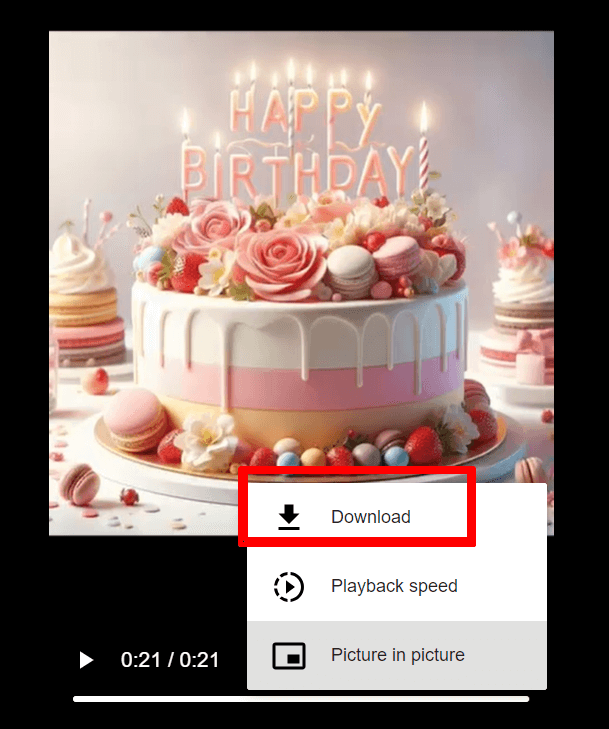
After processing, you'll see available download options. Choose your preferred quality and format, then click the cloud_download Download button. Follow the browser prompts to save the file to your device.
Download Guide:

Frequently Asked Questions
Is PasteDownload Safe and Secure?
Yes, PasteDownload is completely safe to use. Our service is web-based and requires no software downloads or installations. We don't store your personal information or downloaded content on our servers. All processing happens in real-time, and files are directly transferred to your device.
What Quality and Formats Are Available?
Quality: Videos from Universal are downloaded in their original quality, typically ranging from 480p to 1080p depending on the source.
Formats: Most downloads are available in MP4 format for universal compatibility. Audio extraction to MP3 is supported when applicable.
Special Features: Platform-specific features may vary. For best results, ensure the Universal content is publicly accessible.
Which Platforms Does PasteDownload Support?
PasteDownload supports all major video platforms with dedicated tools for the most popular ones:
Major Platforms (Dedicated Tools):
All Other Platforms:
For additional platforms, use our Universal Video Downloader which supports hundreds of other video sites including Twitch, LinkedIn, Rumble, and many more.
What Should I Do If Downloads Aren't Working?
If you're experiencing download issues, try these troubleshooting steps:
- Check the URL: Ensure the link is correct and the content is publicly accessible
- Try a different browser: Some browsers may have compatibility issues
- Disable ad blockers: These can sometimes interfere with the download process
- Clear browser cache: Old cached data might cause conflicts
If problems persist, please contact our support team and include:
- The exact URL you're trying to download
- Your browser and device information
- A screenshot of any error messages
- Description of what happens when you try to download
We typically resolve reported issues within 24 hours.
Are There Any Download Limits or Costs?
PasteDownload is completely free to use with no download limits, registration requirements, or hidden costs. You can download as many videos, photos, and audio files as you need without any restrictions.
Our service is supported by non-intrusive advertising, which helps us keep the platform free for everyone while maintaining high-quality servers and regular updates.