Changelog
Improved site compatibility and fixed download issues in the latest update for smoother, more reliable performance.
[Latest]
- AD Unlimited Video Downloads — Lightning Fast
- Added Blacksky.community: New Video Downloader.
- Fixed GoFile: Fixed downloading issue.
- Updated TruthSocial: Fixed download issue.
- Updated Kshow123: Added support for all Kshow123 domains.
- Updated LOOM: Fixed videos being downloaded as MPD files
- Fixed Okru [odnoklassniki]: Fixed download processing issue.
- Fixed eBay: Fixed muted audio in downloaded videos.
- Updated Yandex Preview: Updated & Fixed.
- Updated DZEN Video: Download failures fixed.
- Added Buzzerfan: New Video Downloader.
- Updated Tumblr: Bug fixed. It works again.
- Fixed Reddit: Download video with sound
- Updated BiliBili.com: Read a new download instruction!
What is PasteDownload.com?
PasteDownload.com is a free online tool that helps you download videos and music from popular websites—directly from your browser.
There’s no software to install and no complicated setup. Just paste the link, choose the format or quality you want, and download your file in seconds.
Using PasteDownload is straightforward. Copy the video or audio link, paste it into the box above, and click download. We’ll take care of the rest and show you the available options, so you can pick what suits you best and save it to your device for offline use.
Supported platform
Our service works with popular video and social media platforms. Simply paste any video URL into the form above to get started or choose a specific tool for the best experience with your preferred platform:
How to Download Videos
Follow our simple step-by-step guide to download videos from any supported platform:
Step 1: Copy Video URL
Follow these simple steps to download any video:
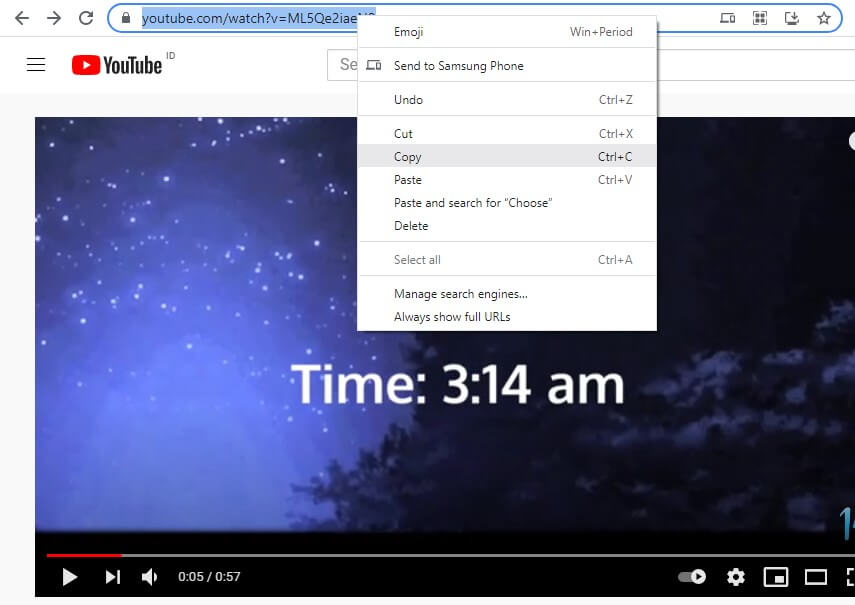
Copy the URL of the video you want to download. Right-click and select "Copy Link Address" or use Ctrl+C.
Step 2: Download Your Video
Paste the copied URL into our download form and process your video:
Download Instructions:
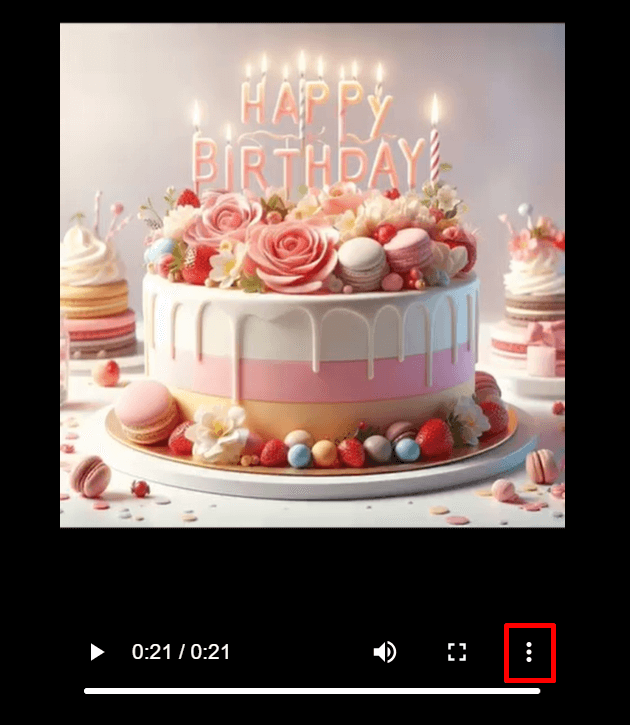
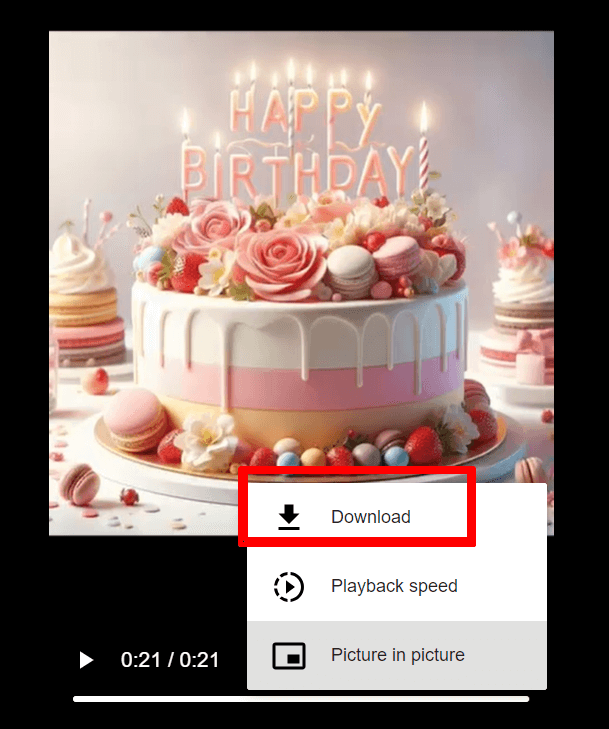
Once the video has been successfully processed, click the cloud_download Download button and follow the instructions shown in these images:
Service Features
Our platform provides a reliable way to save videos from the web with these key features:
- Browser-based: Works directly in your web browser
- No software required: No downloads or installations needed
- Multiple formats: Save as MP4 video or MP3 audio
- Quality options: Choose from available quality settings
- Free service: No registration or fees required
- Regular maintenance: Updated to maintain compatibility
Format Support
Our service outputs files in common formats compatible with most devices and media players. Available formats depend on the source content.
Frequently Asked Questions
Common Questions About Our Service
Is PasteDownload Safe to Use?
Yes. PasteDownload works entirely in your browser and doesn’t require any software installation. We regularly monitor the service to keep it safe and secure for everyday use.
Which Video Platforms Are Supported?
PasteDownload supports many popular platforms such as YouTube, Facebook, Instagram, TikTok, Twitter, Vimeo, and Dailymotion. For other websites, you can try our universal downloader.
What Formats Are Available?
Video downloads are usually available in MP4 format, while audio can be saved as MP3. Available quality options depend on the original video.
Can I Download Private Videos?
Yes, for some platforms we provide dedicated tools for private videos, such as:
- Private Facebook Video Downloader
- Private Instagram Video Downloader
- Private VK Video Downloader
- Private Video Downloader
You can only download private content if you already have permission to view it.
What Should I Do If I Have Download Problems?
If something doesn’t work, please contact us through the Contact Form and include:
- The video link
- A brief description of the issue
- Your device and browser information (if possible)
This helps us resolve issues faster.
Are There Usage Limits?
PasteDownload is free to use and doesn’t require registration. There are no strict limits for normal personal use.