Changelog
Improved site compatibility and fixed download issues in the latest update for smoother, more reliable performance.
[Latest]
- AD Unlimited Video Downloads — Lightning Fast
- Added OnePodcast.it: A New Podcast Downloader.
- Updated Vecteezy: Updated core video downloader 👍.
- Updated Onsen.ag: Fixed downloading issue.
- Added RTNews: New video downloader.
- Added ServusTV: New video downloader.
- Updated SVT Play: Updated core video downloader.
- Added Fm4.orf.at: Download podcasts from Fm4.orf.
- Updated Imgur: Updated core video downloader.
- Improved CNN: Now supports podcast audios
- Updated Naver: Now supports short videos
- Updated LOOM: Fixed video download issue
- Updated iQiyi: Downloader updated.
- Fixed Likee: Fixed downloading issue.
- Fixed Reddit: Download video with sound
- Updated BiliBili.com: Read a new download instruction!
CHECK THIS OUT
Download SproutVideo Content - Save Business & Educational Videos
Access and save professional video content from SproutVideo, a leading business-focused video hosting platform designed for companies, educators, and professional content creators. SproutVideo specializes in secure video hosting, advanced analytics, and professional video management tools that serve businesses worldwide.
Our SproutVideo downloader preserves original video quality while supporting various content formats including training videos, marketing content, educational materials, and corporate presentations. Perfect for business professionals, educators, trainers, marketing teams, or anyone needing access to professional video content for offline viewing and reference.
Whether you're downloading training materials for offline study, saving marketing videos for analysis, collecting educational content, or preserving important business presentations, our downloader ensures you have access to SproutVideo's professional video ecosystem.
Our SproutVideo downloader is designed to be fast, reliable, and user-friendly, requiring no software installation or registration.Key Features:
- Business video downloads
- Training material access
- Marketing content saving
- Educational video support
- Corporate presentation downloads
- HD quality preservation
- Professional content access
- Secure video handling
How to Use:
- Copy the video URL from SproutVideo
- Paste the URL in the input field above
- Click the "Download" button to process
- Select your preferred quality and format
- Save the file to your device
Important Limitations:
info Only publicly accessible SproutVideo content can be downloaded. Private videos, password-protected content, or videos requiring business account access cannot be retrieved. Some corporate content may have additional security restrictions.
URL Format: SproutVideo URLs typically look like: https://videos.sproutvideo.com/embed/119cd6bc1a18e6cd98/30751a1761ae5b90
Need Help? If you encounter any issues downloading from SproutVideo, please ensure the URL is correct and publicly accessible. For additional support, contact our support team.
Looking for other platforms? Try our Universal Video Downloader for support of hundreds of additional video sites, or visit our specialized tools for YouTube, Facebook, or Instagram.
Follow these simple steps to download content from The SproutVideo:
Step 1: Copy the URL
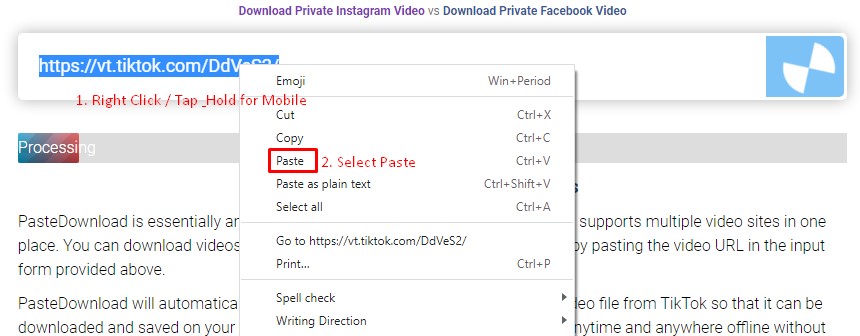
Navigate to SproutVideo and find the video, audio, or photo you want to download. Copy the URL from your browser's address bar or use the platform's share function to get the link. Paste this URL into the download form above and click the Download button.
Step 2: Select and Download
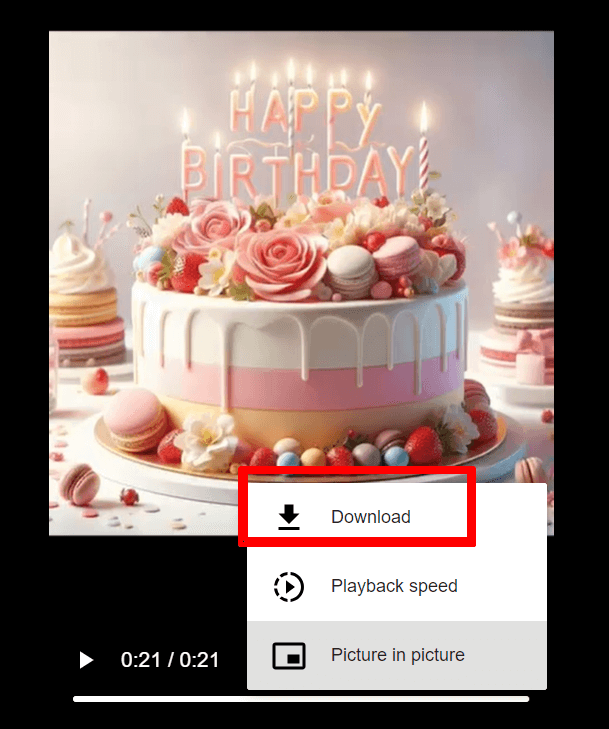
After processing, you'll see available download options. Choose your preferred quality and format, then click the cloud_download Download button. Follow the browser prompts to save the file to your device.
Download Guide:

Frequently Asked Questions
Is PasteDownload Safe and Secure?
Yes, PasteDownload is completely safe to use. Our service is web-based and requires no software downloads or installations. We don't store your personal information or downloaded content on our servers. All processing happens in real-time, and files are directly transferred to your device.
What Quality and Formats Are Available for SproutVideo?
Quality: Videos from SproutVideo are downloaded in their original quality, typically ranging from 480p to 1080p depending on the source.
Formats: Most downloads are available in MP4 format for universal compatibility. Audio extraction to MP3 is supported when applicable.
Special Features: Platform-specific features may vary. For best results, ensure the SproutVideo content is publicly accessible.
Which Platforms Does PasteDownload Support?
PasteDownload supports all major video platforms with dedicated tools for the most popular ones:
Major Platforms (Dedicated Tools):
All Other Platforms:
For additional platforms, use our Universal Video Downloader which supports hundreds of other video sites including Twitch, LinkedIn, Rumble, and many more.
What Should I Do If Downloads Aren't Working?
If you're experiencing download issues, try these troubleshooting steps:
- Check the URL: Ensure the link is correct and the content is publicly accessible
- Try a different browser: Some browsers may have compatibility issues
- Disable ad blockers: These can sometimes interfere with the download process
- Clear browser cache: Old cached data might cause conflicts
If problems persist, please contact our support team and include:
- The exact URL you're trying to download
- Your browser and device information
- A screenshot of any error messages
- Description of what happens when you try to download
We typically resolve reported issues within 24 hours.
Are There Any Download Limits or Costs?
PasteDownload is completely free to use with no download limits, registration requirements, or hidden costs. You can download as many videos, photos, and audio files as you need without any restrictions.
Our service is supported by non-intrusive advertising, which helps us keep the platform free for everyone while maintaining high-quality servers and regular updates.