Changelog
Improved site compatibility and fixed download issues in the latest update for smoother, more reliable performance.
[Latest]
- AD Unlimited Video Downloads — Lightning Fast
- Updated Smotrim: Core downloader updated.
- Updated LOOM: Fixed video download issue
- Updated iQiyi: Downloader updated.
- Improved SoopLive: Added support for new domain.
- Updated RTP.pt: Fixed issue with incorrect video episodes.
- Added Ci.me (Korean): New Video Downloader.
- Fixed Likee: Fixed downloading issue.
- Fixed GoFile: Fixed downloading issue.
- Updated TruthSocial: Fixed download issue.
- Updated Kshow123: Added support for all Kshow123 domains.
- Fixed Okru [odnoklassniki]: Fixed download processing issue.
- Updated Yandex Preview: Updated & Fixed.
- Updated Tumblr: Bug fixed. It works again.
- Fixed Reddit: Download video with sound
- Updated BiliBili.com: Read a new download instruction!
Free Instagram Video and Photo Downloader
Download Instagram videos, photos, stories, and IGTV content easily with our free Instagram downloader. Save your favorite Instagram content in high quality - no watermarks, no account required. Simply paste any Instagram URL and download instantly.
Instagram Downloader Features:
- Download Instagram videos in HD quality
- Save Instagram photos in original resolution
- Download Instagram Stories (while available)
- Save IGTV videos and Reels
- No watermarks or quality loss
- Works on mobile and desktop
How to Download Instagram Videos and Photos
Step 1: Copy Instagram URL
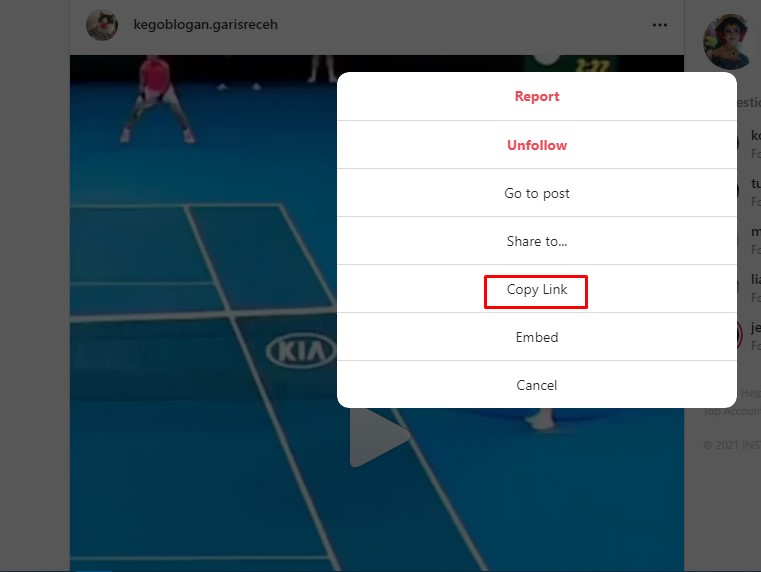
Open the Instagram app or website and find the video or photo you want to download. Tap the three dots menu and select "Copy Link". On Instagram web, copy the URL from your browser's address bar.
Step 2: Paste and Download
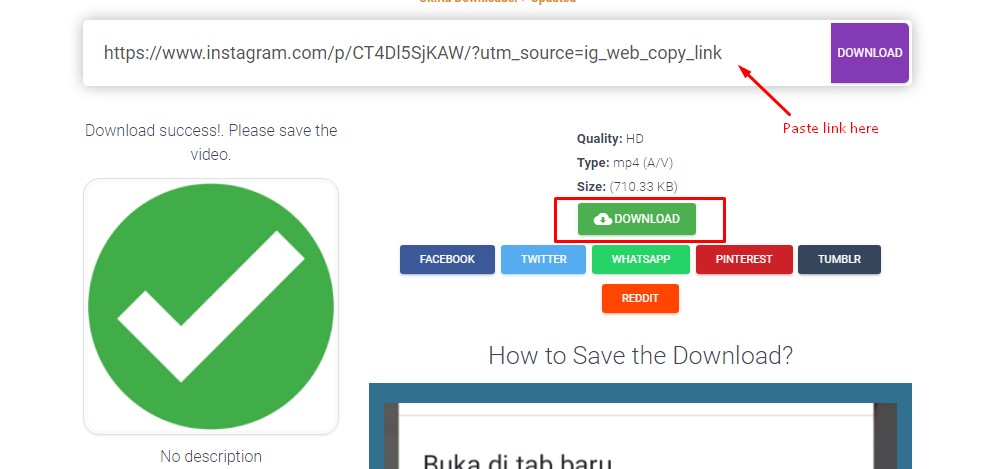
Paste the copied Instagram URL into our downloader above and click the download button. Our tool will process the link and generate download options. Right-click the download button to save the content to your device.
Supported Instagram URL Formats
Our Instagram downloader supports all public Instagram content URLs:
- Posts: https://www.instagram.com/p/ABC123/
- Reels: https://www.instagram.com/reel/XYZ789/
- IGTV: https://www.instagram.com/tv/DEF456/
- Stories: https://www.instagram.com/stories/username/
Frequently Asked Questions
Is it free to download Instagram videos?
Yes, our Instagram downloader is completely free to use. No registration, no payment, no hidden fees.
Can I download private Instagram content?
No, you can only download public Instagram posts. Private content is protected by Instagram's privacy settings and cannot be downloaded without permission.
What quality can I download Instagram videos in?
You can download Instagram videos in their original quality, up to 1080p HD depending on how the content was uploaded to Instagram.
Does this work on mobile devices?
Yes, our Instagram downloader works perfectly on mobile phones, tablets, and desktop computers. No app installation required.
What video and photo formats are supported?
We support all Instagram formats including MP4 videos (up to 1080p), JPG images, carousel posts, and Stories. Audio from videos can also be extracted as MP3 files.
Can I download Instagram Reels?
Yes! Our downloader fully supports Instagram Reels. Simply paste the Reel URL and download in full quality without watermarks.
How do I download Instagram Stories?
Instagram Stories can be downloaded while they're active (within 24 hours). Copy the story URL from your browser when viewing on web, or use the share option in the mobile app.
Technical Specifications & Supported Formats
Video Specifications
- Formats: MP4, WebM
- Quality: Up to 1080p Full HD
- Frame Rates: 24, 30, 60 FPS
- Aspect Ratios: Square (1:1), Portrait (4:5), Landscape (16:9)
- Duration: Up to 60 minutes (IGTV)
Photo Specifications
- Formats: JPG, PNG
- Resolution: Up to 1080x1080px
- Aspect Ratios: Square (1:1), Portrait (4:5)
- Quality: Original resolution maintained
- Carousel: Individual or batch download
Audio Extraction
- Formats: MP3, M4A
- Quality: Up to 128kbps
- Source: Original audio track
- Duration: Matches video length
- Metadata: Preserved when available
Device-Specific Download Instructions
Mobile Devices (iOS/Android)
- Copy Link: In the Instagram app, tap the three dots (⋯) on any post and select "Copy Link"
- Open Browser: Open your mobile browser and navigate to PasteDownload.com
- Paste URL: Long-press in the URL input field and paste the Instagram link
- Download: Tap the download button and select "Save to Downloads" or "Save to Photos"
- Access Files: Find downloaded content in your device's Downloads folder or Photo Gallery
Tip: For faster access, bookmark PasteDownload.com on your mobile home screen!
Desktop Computers (Windows/Mac/Linux)
- Copy URL: Right-click on any Instagram post and select "Copy Link Address"
- Paste Here: Click in the URL field above and paste (Ctrl+V or Cmd+V)
- Process: Click the download button to analyze the content
- Save: Right-click the download button and choose "Save Link As..." or "Save Target As..."
- Location: Choose your preferred download location (Desktop, Downloads folder, etc.)
Pro Tip: Use keyboard shortcut Ctrl+Shift+V (Cmd+Shift+V on Mac) to paste and download in one step!
Common Issues & Troubleshooting
"Content Not Found" Error
Causes:
- Private or deleted Instagram post
- Invalid URL format
- Age-restricted content
Solutions:
- Verify the post is public and still available
- Check the URL format (should start with instagram.com/p/ or instagram.com/reel/)
- Try copying the link again from Instagram
Download Not Starting
Causes:
- Browser popup blocker enabled
- JavaScript disabled
- Temporary server issues
Solutions:
- Disable popup blocker for PasteDownload.com
- Enable JavaScript in browser settings
- Try a different browser (Chrome, Firefox, Safari)
- Clear browser cache and cookies
Mobile Download Issues
Common Problems:
- File opens in browser instead of downloading
- Can't find downloaded files
- Quality lower than expected
Mobile Solutions:
- iPhone/iPad: Long-press download link → "Download Linked File" → Files app
- Android: Tap download → Check Downloads folder or notification panel
- Save to Photos: Download → Long-press image/video → "Save to Photos"
Why Choose Our Instagram Downloader?
PasteDownload vs Other Methods
| Feature | PasteDownload | Mobile Apps | Browser Extensions | Desktop Software |
|---|---|---|---|---|
| No Installation Required | ✓ | ✗ | ✗ | ✗ |
| Works on All Devices | ✓ | Limited | Desktop Only | Desktop Only |
| No Malware Risk | ✓ | Varies | Varies | Varies |
| Always Updated | ✓ | Manual Updates | Manual Updates | Manual Updates |
| Free Forever | ✓ | Often Premium | ✓ | Often Paid |
Advanced Tips & Best Practices
Pro Tips
- Bookmark this page for quick access
- Use Ctrl+V to paste URLs instantly
- Right-click download links to choose save location
- Download Stories before they expire (24 hours)
- Check for carousel posts - download all images
Privacy & Safety
- We never store your downloaded content
- No registration or personal data required
- All processing happens securely
- Respect others' content and privacy
- Only download public, accessible content
Important Notes
- Always respect copyright and usage rights
- Private content cannot be downloaded
- Some content may have download restrictions
- Use downloaded content responsibly
- Give credit to original creators when sharing
Download Performance & Quality Optimization
Lightning Fast
Average processing time: 2-5 seconds
High Quality
Original resolution up to 1080p maintained
Mobile Optimized
Perfect experience on all devices
100% Safe
No malware, ads, or unwanted software
Important: Please respect content creators' rights and Instagram's terms of service. Only download content you have permission to use, and always give proper credit to the original creators.