Changelog
Improved site compatibility and fixed download issues in the latest update for smoother, more reliable performance.
[Latest]
- AD Unlimited Video Downloads — Lightning Fast
- Updated Kshow123: Added support for all Kshow123 domains.
- Updated LOOM: Fixed videos being downloaded as MPD files
- Fixed Okru [odnoklassniki]: Fixed download processing issue.
- Fixed eBay: Fixed muted audio in downloaded videos.
- Updated Yandex Preview: Updated & Fixed.
- Updated DZEN Video: Download failures fixed.
- Added Buzzerfan: New Video Downloader.
- Improved NicovideoJP: Download issue fixed.
- Updated Tumblr: Bug fixed. It works again.
- Fixed Reddit: Download video with sound
- Updated BiliBili.com: Read a new download instruction!
Download Loom Screen Recordings & Video Messages
Save professional screen recordings and video messages from Loom, the leading platform for business communication, team collaboration, and educational content creation. Loom specializes in quick screen recordings, video messages, and presentation captures that are essential for modern remote work and digital communication.
Our downloader preserves original video quality while supporting Loom's various content formats including screen recordings, webcam videos, and combination recordings. Perfect for business professionals archiving important presentations, educators saving tutorial content, team members preserving training materials, or anyone needing offline access to Loom communications.
Ideal for creating training libraries, preserving important business communications, building educational resources, and maintaining offline access to critical video content.
Our Loom downloader is designed to be fast, reliable, and user-friendly, requiring no software installation or registration.Key Features:
- Screen recording downloads
- Video message preservation
- Business presentation support
- Educational content saving
How to Use:
- Copy the video URL from Loom
- Paste the URL in the input field above
- Click the "Download" button to process
- Select your preferred quality and format
- Save the file to your device
Important Limitations:
info Only publicly shared Loom videos can be downloaded. Private recordings, password-protected content, or videos requiring workspace access cannot be retrieved. Some enterprise content may have additional restrictions.
URL Format: Loom video URLs typically look like: https://www.loom.com/share/1234567890abcdef
Need Help? If you encounter any issues downloading from Loom, please ensure the URL is correct and publicly accessible. For additional support, contact our support team.
Looking for other platforms? Try our Universal Video Downloader for support of hundreds of additional video sites, or visit our specialized tools for YouTube, Facebook, or Instagram.
Follow these simple steps to download content from The Loom:
Step 1: Copy the URL
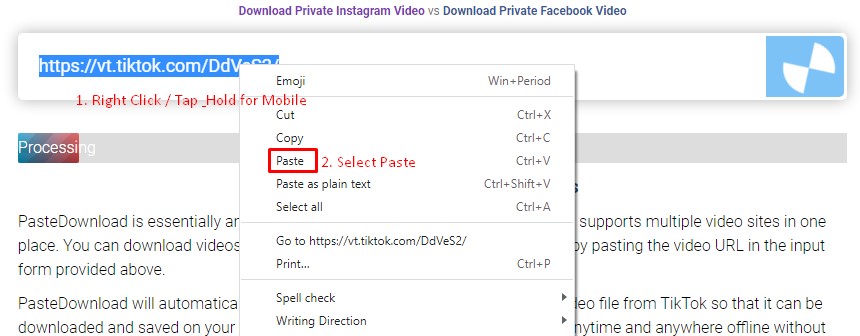
Navigate to Loom and find the video, audio, or photo you want to download. Copy the URL from your browser's address bar or use the platform's share function to get the link. Paste this URL into the download form above and click the Download button.
Step 2: Select and Download
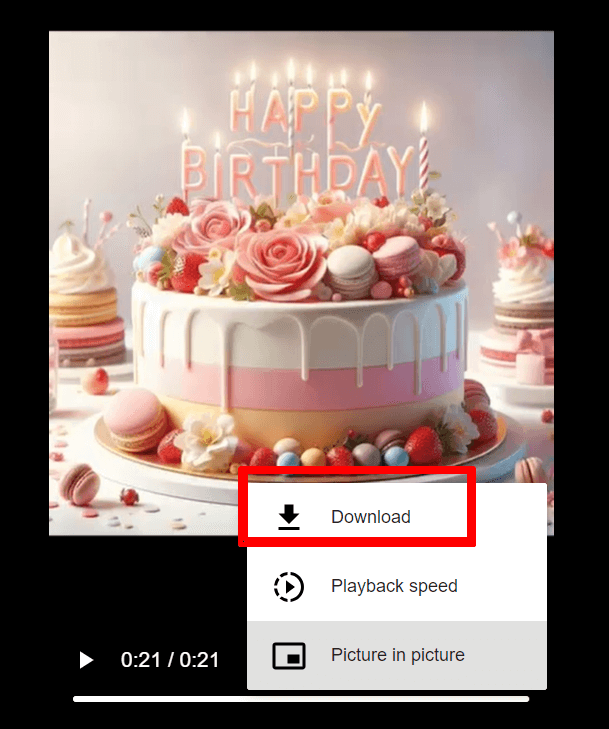
After processing, you'll see available download options. Choose your preferred quality and format, then click the cloud_download Download button. Follow the browser prompts to save the file to your device.
Download Guide:

Frequently Asked Questions
Is PasteDownload Safe and Secure?
Yes, PasteDownload is completely safe to use. Our service is web-based and requires no software downloads or installations. We don't store your personal information or downloaded content on our servers. All processing happens in real-time, and files are directly transferred to your device.
What Quality and Formats Are Available for Loom?
Quality: Videos from Loom are downloaded in their original quality, typically ranging from 480p to 1080p depending on the source.
Formats: Most downloads are available in MP4 format for universal compatibility. Audio extraction to MP3 is supported when applicable.
Special Features: Platform-specific features may vary. For best results, ensure the Loom content is publicly accessible.
Which Platforms Does PasteDownload Support?
PasteDownload supports all major video platforms with dedicated tools for the most popular ones:
Major Platforms (Dedicated Tools):
All Other Platforms:
For additional platforms, use our Universal Video Downloader which supports hundreds of other video sites including Twitch, LinkedIn, Rumble, and many more.
What Should I Do If Downloads Aren't Working?
If you're experiencing download issues, try these troubleshooting steps:
- Check the URL: Ensure the link is correct and the content is publicly accessible
- Try a different browser: Some browsers may have compatibility issues
- Disable ad blockers: These can sometimes interfere with the download process
- Clear browser cache: Old cached data might cause conflicts
If problems persist, please contact our support team and include:
- The exact URL you're trying to download
- Your browser and device information
- A screenshot of any error messages
- Description of what happens when you try to download
We typically resolve reported issues within 24 hours.
Are There Any Download Limits or Costs?
PasteDownload is completely free to use with no download limits, registration requirements, or hidden costs. You can download as many videos, photos, and audio files as you need without any restrictions.
Our service is supported by non-intrusive advertising, which helps us keep the platform free for everyone while maintaining high-quality servers and regular updates.